
Kitana AI tools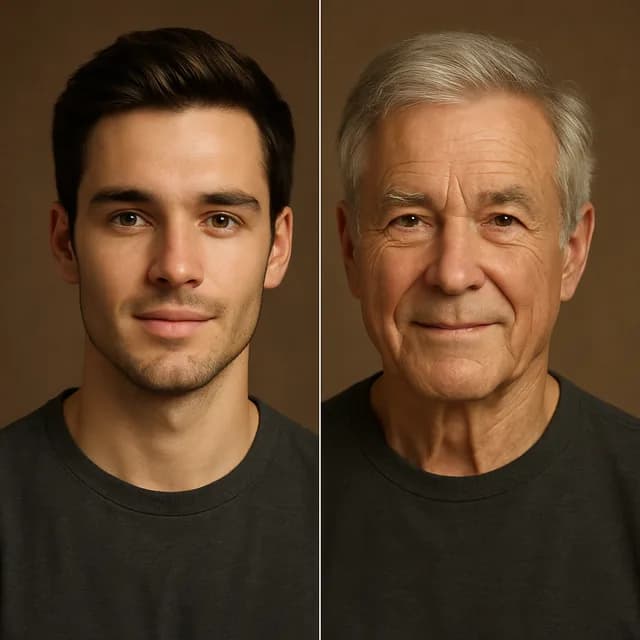
AI age progression
Upload a selfie and see yourself decades older or younger. Kitana ages your face while keeping the features that make it yours.
Sign up — your first 3 photos are free
3 images in the browser with no daily cap and no waiting between them. No card.
or
Already have an account?
By continuing you agree to the Terms of Use and Privacy Policy.
This tool runs in the Kitana app for iPhone and Android.
Or get the app
Why use it
- Go older or younger from the same photo.
- Add up to 3 extra photos of yourself so the result keeps your face, not a lookalike.
- Works from a single clear selfie; no studio shot needed.
How it works
- 1
Pick a photo
A front-facing selfie with even light works best.
- 2
Choose a direction
See yourself older or younger.
- 3
Save the result
Download it or make a variation from the same photo.
Questions
- Is AI age progression accurate?
- It is a plausible picture, not a prediction. Lifestyle, health and sun shape how a face really ages, and no model can see those.
- Why does the older version not look like me?
- Low light or a tilted head gives the model less to hold on to. Add a couple of extra reference photos and try again.
- Is it free?
- Yes, within limits. In the app the free plan gives you 2 creations a day, one every 4 hours. Kitana Pro raises that to 6 a day and adds packs of 2 or 4 variations.
- What happens to my photo?
- Your photo is used only to make your result. Kitana does not build biometric identifiers from it or use it for anything else. The extra reference photos are treated the same way.