
AIKitana AI tools
90s yearbook photo AI
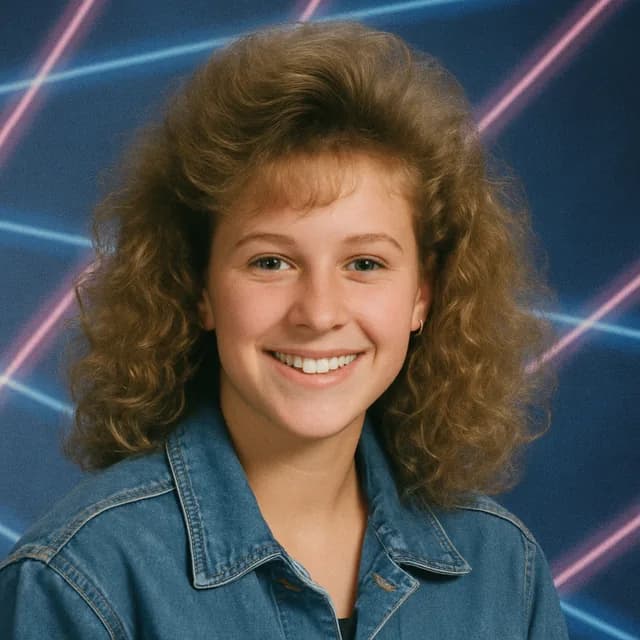
Get a retro 90s yearbook portrait from one selfie — big hair, laser backdrop and that soft studio light included.
This tool runs in the Kitana iPhone app.
How it works
- 1
Upload a selfie
Head and shoulders, facing the camera.
- 2
Generate
Kitana dresses you for picture day, 1995.
- 3
Share it
Save your favourites and post them.
Why use it
- The full 90s look: hair, clothes, backdrop and light.
- Add up to 3 extra photos of yourself so the result keeps your face, not a lookalike.
- A fun set of variations from a single photo.
Sign up — your first 3 photos are free
3 images in the browser with no daily cap and no waiting between them. No card.
or
Already have an account?
By continuing you agree to the Terms of Use and Privacy Policy.
Why people make one
Class reunions
Make a portrait for everyone who is coming and put them on the invitation or the big screen.
Throwback posts
A 90s portrait is an easy, fun post for a birthday or a throwback Thursday.
Team fun
Run it for each person on the team for a retro team page or a party slide.
The decade you missed
Born after the 90s? See how you would have looked on picture day.
Tips for the retro look
- Frame yourself from the chest up, the way a school photographer would.
- Use even light on your face; Kitana adds the soft studio light.
- Leave your hair loose and visible, since the hairstyle carries a lot of the look.
- Take off hats and sunglasses, which do not fit the picture-day style.
- Add reference photos so the retro version keeps your face under the new hair and clothes.
Questions
- How do I get the 90s yearbook look right?
- Use a head-and-shoulders selfie with even light. A plain background and no hat make the retro styling land better.
- Can I do this for a whole group?
- Run it once per person with their own selfie, then put the portraits side by side for the full yearbook page.
- Will my hair and clothes change?
- Yes, that is part of the look. Expect 90s hair, clothes and a classic backdrop, while your face stays recognisably yours.
- Is it just a filter?
- No. It makes a new portrait of you in a 90s studio setting rather than laying an effect over your selfie, so hair, clothes and light change together.
- Why do some results look less like me?
- New hair and clothes change a lot, so your face has to carry the likeness. A clear, front-facing selfie and a few reference photos keep it closer.
- Is it free?
- Yes, within limits. In the Kitana iPhone app the free plan gives you 2 creations a day, one every 4 hours. Kitana Pro raises that to 6 a day and adds packs of 2 or 4 variations.
- What happens to my photo?
- Your photo is used only to make your result. Kitana does not build biometric identifiers from it or use it for anything else. The extra reference photos are treated the same way.