Best Prompts for AI Portraits: 25 Examples and Why They Work
Copyable AI portrait prompts for headshots, editorial, painterly and cinematic looks, plus the structure behind them so you can write your own and fix prompts that go wrong.
The best prompts for AI portraits describe four things in plain, concrete words: framing (head and shoulders, half body), light (soft window light from the left), background (plain warm grey) and style or medium (natural colour photograph, oil painting). Get those four right and most portraits come out usable on the first or second try.
Below is a structure you can reuse, 25 example prompts grouped by look, and a troubleshooting section for when a prompt misbehaves.
The four-part portrait prompt
Every prompt in this guide follows the same skeleton:
Subject and framing. Who, and how much of them. "Head and shoulders portrait of a woman in a navy blazer."
Light. Direction, quality, colour. "Soft daylight from a large window on the left."
Background and setting. "Plain warm grey studio backdrop" or "blurred bookshelves".
Style or medium. "Natural colour photograph, shallow depth of field" or "loose watercolour".
Optional fifth part: mood or expression. "Relaxed, slight smile."
Why this order? Models weight early words heavily, and framing is the thing people most often get wrong: leave it out and you get a full-body shot where the face is a few pixels wide. For a longer treatment of prompt structure, see how to write text-to-image prompts.
If you are working from your own photo (headshot or restyle tools), you can skip describing the face and focus on everything else.
Professional headshot prompts
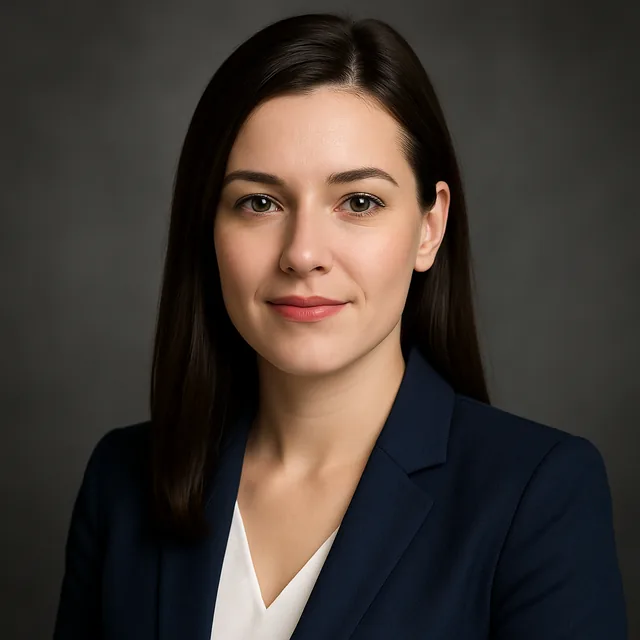
Head and shoulders headshot, charcoal blazer, soft window light from the left, plain light grey backdrop, natural colour photograph, relaxed expression.
Corporate headshot, white shirt, even studio lighting with a soft fill, neutral blue-grey background, sharp focus on the eyes.
The face is too small. Add explicit framing: "head and shoulders", "close-up".
Everyone looks airbrushed. Ask for "natural skin texture" and avoid words like "flawless" or "perfect skin".
The style is muddled. You have probably named two styles that conflict ("photorealistic watercolour"). Pick one.
The light is flat. Name a direction: "light from the left", "backlit", "overhead". "Good lighting" means nothing to a model.
It stopped looking like you. Remove words that imply a different person: ages, body types, "model", "beautiful". Describe the scene, not the face. Our explainer on why AI avatars don't look like you covers the rest.
Hands and text are broken. Crop tighter, or regenerate. Both remain weak spots across models.
A lighting vocabulary for portrait prompts
Light is the part of a prompt with the biggest effect on the result, and most people describe it vaguely. These terms come from photography and painting, and current image models generally understand them:
Window light. Soft, directional daylight from one side. Flattering and natural; the default for headshots.
Rembrandt lighting. Light from high on one side, leaving a small triangle of light on the shadowed cheek. Classic and dramatic.
Butterfly lighting. Light from directly in front and slightly above, creating a small shadow under the nose. Glamorous, common in beauty portraits.
Split lighting. Half the face lit, half in shadow. Moody, good for creative and cinematic looks.
Backlight or rim light. Light behind the subject outlining hair and shoulders. Separates the subject from a dark background.
Golden hour. Low, warm sunlight shortly after sunrise or before sunset. Warm skin tones and long shadows.
Overcast. Even, shadowless light. Honest and calm, good when you want natural skin.
Pair one lighting term with a direction ("from the left") and a colour if it matters ("warm", "cool blue"), and you have covered most of what a photographer would set up.
Lens and camera words that actually help
A few photographic terms reliably change the look of a portrait:
"Shallow depth of field" blurs the background and pulls attention to the face.
"85mm portrait lens" tends to produce flattering, slightly compressed facial proportions and a soft background. Wide-angle terms like "24mm" exaggerate features close to the camera and are rarely flattering for close-ups.
"Eye level" keeps the camera neutral. "Low angle" makes the subject look taller and more imposing; "high angle" makes them look smaller.
"Film grain" or naming a film look ("muted film colours") softens the digital sheen of generated images.
You do not need all of these. One lens or framing term alongside the four-part structure is usually enough.
Adapting a prompt for your own photo
When you use a headshot or restyle tool on your own photo, the prompt does a slightly different job. The model already has your face, so describing a face is at best wasted words and at worst a conflicting instruction. Strip any description of age, features or expression you do not actually have, and keep the parts about clothing, light, background and style. For example, prompt 1 becomes: "Charcoal blazer, soft window light from the left, plain light grey backdrop, natural colour photograph." If you want to keep something specific, such as your glasses or hairstyle, say so, because restyles sometimes drop small details.
Iterate, don't rewrite
The fastest way to a great portrait is to keep a prompt that is almost right and change one part at a time: the light first, then the background, then the style. Generate a few variations at each step, which our guide to variation packs explains.
You can paste any of these prompts into the browser studio: use text to image for an invented portrait, or the AI headshot and restyle tools to apply them to your own photo.
Frequently asked questions
What makes a good AI portrait prompt?
A good portrait prompt names the subject and framing, the lighting, the background, and the style or medium, in plain concrete words. 'Head and shoulders, soft window light from the left, plain grey backdrop, natural colour photograph' is better than a long list of quality adjectives.
Do words like '8k' and 'masterpiece' help?
With modern image models they add little. They were a workaround for older models trained on scraped image captions. Describing the light, lens and setting you actually want has a much bigger effect.
How do I keep my face the same when using a portrait prompt?
Use a tool that works from your photo, such as an AI headshot or restyle tool, rather than pure text-to-image. Then avoid prompt words that change identity, like a different age, ethnicity or 'become a…'. Describe clothes, light and setting instead.
How long should a portrait prompt be?
One to three sentences is usually enough. Longer prompts are fine if every phrase adds something visual; they fail when they pile up contradictory styles or repeat the same idea.
Can I use these prompts with any AI tool?
Yes. They are written in plain descriptive language, which works across most current image models. Results will vary between models, so treat each prompt as a starting point and adjust.
Ready to put this into practice?
Create with Kitana using the tool that fits this guide.