
Kitana AI tools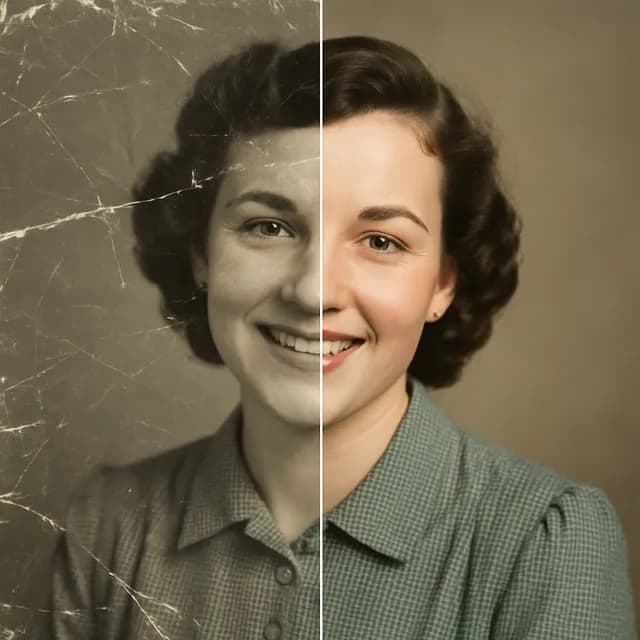
Restore old photos with AI
Repair scratches, creases and fading in old family photos, and bring black-and-white prints back in colour.
Sign up — your first 3 photos are free
3 images in the browser with no daily cap and no waiting between them. No card.
or
Already have an account?
By continuing you agree to the Terms of Use and Privacy Policy.
This tool runs in the Kitana app for iPhone and Android.
Or get the app
Why use it
- Repairs scratches, creases and faded patches.
- Adds natural colour to black-and-white photos.
- Works from a phone photo of a print.
How it works
- 1
Scan or photograph the print
Flat, in daylight, with no glare.
- 2
Restore
Kitana repairs damage and can add colour.
- 3
Save and share
Download it and send it to the family.
Questions
- How do I get the best scan of an old photo?
- Lay it flat by a window, shoot straight down, and avoid flash. Glare and a tilted angle are harder to fix than scratches.
- Are the colours historically accurate?
- They are a plausible guess. The model has no record of the original colours, so check details like uniforms or cars against what the family remembers.
- Is it free?
- Yes, within limits. In the app the free plan gives you 2 creations a day, one every 4 hours. Kitana Pro raises that to 6 a day and adds packs of 2 or 4 variations.
- What happens to my photo?
- Your photo is used only to make your result. Kitana does not build biometric identifiers from it or use it for anything else.