How to Make a Professional Profile Picture From a Selfie
Professional profile picture from a selfie: how to shoot one that works, the edits that matter, when an AI headshot helps, and staying like you.
Also in:TürkçeDeutschEspañolPortuguêsFrançais日本語Bahasa Indonesiaالعربيةहिन्दी
On this page
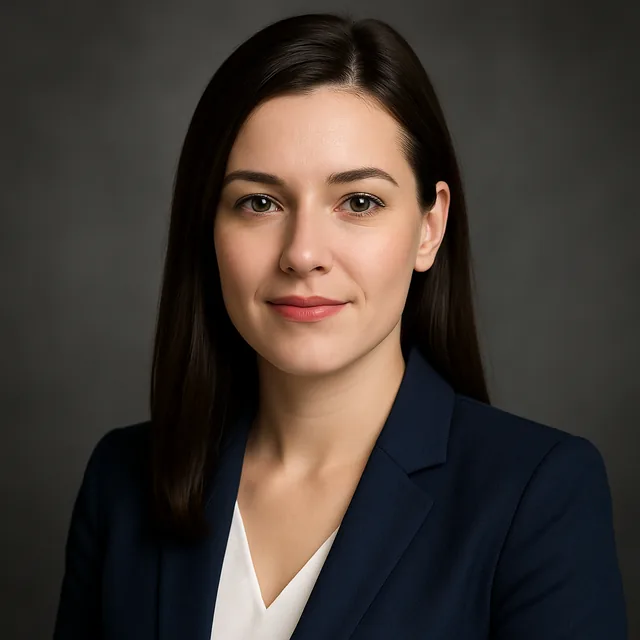
To make a professional profile picture from a selfie, take a sharp, front-facing photo in soft daylight with the phone at eye level, then either tidy it with simple edits (crop, straighten, brighten) or run it through an AI headshot tool to change the background, clothing and lighting. Pick the result that looks like you on a good day, crop it for each platform, and keep the original.
That covers most people. The rest of this guide explains how to take a selfie that gives a good result, which edits matter, and how to avoid the uncanny, too-perfect look.
Step 1: Take a selfie that can become a headshot
Everything downstream depends on this photo. A few minutes here save an hour of retries.
- Light: face a window with soft daylight. Avoid overhead lights and direct sun, which put harsh shadows under the eyes.
- Distance: do not shoot at arm's length. Prop the phone at eye level about a metre away and use the timer or a remote. Close-up selfies make the nose look bigger and the ears smaller.
- Camera: use the main rear camera if you can; it is usually sharper than the front one.
- Angle: lens at eye level or slightly above, shoulders turned a little, face towards the camera.
- Expression: a relaxed, natural smile. Take twenty frames and pick the best.
- Clothes: something plain that you would wear to work. Busy patterns distract and sometimes confuse AI tools.
Our guide to preparing photos for the best AI results goes into more detail on source photos.
Step 2: Decide how much editing you need
There are two routes, and both are legitimate.
Light edit. If the selfie is already good, you may only need to crop, straighten, adjust brightness and contrast, and soften a distracting background. This keeps the photo fully authentic.
AI headshot. If the background is messy, the light is flat or you want a more formal look, an AI headshot tool can re-render the photo with a neutral backdrop, better lighting and work clothing while keeping your face. Kitana's AI headshot tool does this in the browser, and adding reference photos helps it keep your likeness.
Step 3: Choose a style that fits your field
A profile picture should look like the people in your field, only a little better.
| Field | Style that usually fits |
|---|---|
| Finance, law, consulting | Corporate: plain grey or navy backdrop, jacket, even light |
| Tech and startups | Relaxed: soft office or outdoor background, smart casual |
| Creative work | More colour, natural light, personality in the clothing |
| Healthcare and education | Warm, approachable, plain background |
| Sales and real estate | Friendly smile, bright, clean background |
For a fuller comparison, read corporate, startup or creative: which AI headshot style to choose.
Step 4: Keep it looking like you
The biggest risk with AI headshots is not a bad image; it is a good image of someone slightly different. Check each result against the original:
- Are the eye shape, nose and jaw the same?
- Is your age believable?
- Is your skin texture still there, or has it been smoothed into plastic?
- Is your hairline where it really is?
Reject anything that fails these checks, even if it looks impressive. People will meet you, and a mismatch is more damaging than an ordinary photo. Our explainer on why AI avatars don't look like you and how reference photos fix it covers the causes.
Step 5: Crop for each platform
One headshot, several crops:
- LinkedIn: square, at least 400 × 400 pixels, head and shoulders, shown as a circle.
- Instagram and TikTok: square, cropped tighter, because they are shown smaller. See the Instagram profile picture size and crop guide.
- CV or website: often a 4:5 portrait crop with a bit more shoulder.
- Email signature and chat apps: a tight square crop, small file.
Keep the full-size original so you can make new crops later without losing quality.
Common mistakes
- Arm's-length selfie. The distortion survives editing.
- Beauty filter before the headshot tool. Smoothing removes the detail the AI needs to keep your likeness.
- Picking the most glamorous result. Pick the most accurate one.
- Mismatched crops. A head that fills the LinkedIn circle but is tiny on your website looks careless.
- Using it for official documents. Passports and IDs need an unedited photo. See can you use an AI-edited photo for a passport or ID.
When to book a photographer instead
An AI headshot from a good selfie is enough for most profiles. To compare apps on your own face rather than on a ranking, use the test in best AI apps for profile pictures. A photographer is still worth it if you need a set of matching images for a company website, press photos, or a brand built around your face; AI photos for a personal brand website covers how far a consistent AI set can go there. For a side-by-side look at the trade-offs, read AI avatar vs professional photo.
Privacy
Uploading your face is reasonable to think about. In Kitana, photos are used only to make your result, EXIF and GPS data are stripped, no biometric identifiers are kept, and free results are deleted after seven days. More detail is in the privacy policy.
Frequently asked questions
- Can a selfie really become a professional headshot?
- Yes, if the selfie is sharp, well lit and front-facing. An AI headshot tool can replace the background, clothing and lighting, but it cannot recover detail the photo never captured, so the source photo still matters most.
- Will an AI headshot still look like me?
- It should, if you start from a clear photo and choose a result that looks like you on a good day. Adding reference photos helps the model hold your features. Reject any version that changes your face shape, eyes or age.
- Is an AI profile picture acceptable on LinkedIn?
- Many people use them. The important thing is honesty: the picture should look like the person who turns up to the interview or the meeting.
- Can I use it as a passport or ID photo?
- No. Official ID photos must generally be recent and unedited. Use an AI headshot for LinkedIn, a CV or a team page, and an unedited camera photo for official documents.
- How much does it cost to make one with Kitana?
- Kitana has a free tier on the web and in the mobile app, and Pro plans for more volume. The pricing page lists the current free allowance and plan prices.
Ready to put this into practice?
Create with Kitana using the tool that fits this guide.
Create a professional headshotReady to try it yourself?
Try it in your browser in under a minute, or take it with you in our mobile app.
Create a professional headshot